

 MMM
MMM Tired of Your Paper Resume Getting Lost in the Pile? Here’s How a Video Resume Can Change Everything
Let’s be real. The job market is crowded. You’re awesome, you’re qualified, but so are hundreds of other people applying for the same role. Your meticulously crafted, one-page PDF resume? It often gets about six seconds of a recruiter’s attention before it’s tossed into the ‘maybe’ or, more likely, the ‘no’ pile. It feels like shouting into a void. But what if you could walk right into the recruiter’s office, look them in the eye, and show them exactly who you are? That’s the power of a great video resume. It’s not just a trend; it’s a strategic tool that transforms you from a list of bullet points into a living, breathing, and memorable candidate.
Creating a video resume isn’t about being a Hollywood director or having a fancy camera. It’s about personality. It’s about connection. It’s your chance to share your passion, your communication skills, and your unique energy in a way that a piece of paper never, ever could. Think of it as your personal elevator pitch on steroids. It can be the one thing that makes a hiring manager stop scrolling, lean in, and say, “Wow, I need to talk to this person.” In this guide, we’re going to break down everything—from scripting your story to hitting ‘upload’—to help you create a video that doesn’t just get seen, it gets you noticed.
Key Takeaways
- A video resume complements, but doesn’t replace, your traditional resume. It’s your chance to showcase your personality and communication skills.
- Preparation is 90% of the battle. A solid script, a good location, and a clear plan are non-negotiable.
- You don’t need expensive gear. A modern smartphone, good lighting (natural light is best!), and clear audio are all you really need to start.
- Keep it short and punchy. Aim for 60-90 seconds. Recruiters are busy, so make every second count.
- Authenticity wins. Let your genuine personality shine through. Don’t try to be someone you’re not.
Why Bother With a Video Resume Anyway? Is It Worth The Hype?
You might be thinking, “Isn’t this just extra work? My written resume is fine!” And hey, I get it. The job hunt is already a full-time job. But let’s look at the facts. We live in a video-first world. People would rather watch a short video than read a long block of text. Recruiters are people, too. Giving them a video is like offering a delicious appetizer before the main course (your full application). It makes their job easier and more interesting.
Here’s the breakdown of why it’s a game-changer:
- It Shows Off Your Personality: Are you energetic and creative? Calm and analytical? A great storyteller? These are qualities that are incredibly hard to convey in a Word document. A video brings your personality to the forefront, allowing you to build an instant rapport.
- It Demonstrates Communication Skills: For any role that’s client-facing, involves presentations, or requires strong interpersonal skills (which is most of them!), a video is your proof. You’re not just telling them you’re a great communicator; you’re showing them.
- It Highlights Your Creativity and Initiative: Just by making a video resume, you’re signaling that you’re willing to go the extra mile. You’re showing you’re tech-savvy, creative, and proactive. These are huge ticks in the ‘plus’ column for any employer.
- It Makes You Memorable: After sifting through 100 black-and-white resumes, a recruiter is far more likely to remember the candidate with the engaging, well-produced video. You become a face and a voice, not just a name on a list.

Phase 1: The Blueprint – Planning Your Video Resume Before You Hit Record
Jumping in front of a camera without a plan is a recipe for disaster. You’ll ramble, forget key points, and come across as unprofessional. The magic of a great video happens long before the red light turns on. This pre-production phase is where you build the foundation for a compelling story.
Step 1: Define Your Goal and Audience
First things first. Who is this for, and what do you want it to achieve? Don’t just make a generic video. Tailor it. Are you applying to a funky, creative ad agency? Your tone can be more playful and visually dynamic. A corporate law firm? You’ll want a more polished, professional, and direct approach. Analyze the company culture and the job description. What are their core values? What specific skills are they looking for? Your video should speak their language and directly address their needs.
Step 2: Scripting Your 90-Second Story
Never, ever wing it. A script is your safety net and your roadmap. It ensures you hit all your key points concisely and confidently. But please, don’t write a novel. You’re aiming for a 60-90 second video, which translates to roughly 150-225 words. That’s it! Every word has to earn its place.
A great framework for your script is the classic AIDA model:
- Attention (0-15 seconds): Start with a bang! This is your hook. Introduce yourself and state the specific role you’re applying for. Maybe start with a compelling question or a bold statement about your passion for the industry. Example: “Hi, I’m Sarah Jenkins. For the last five years, I’ve been obsessed with turning complex data into simple, beautiful stories. That’s why I was so excited to see the Data Visualization role at Innovate Corp.”
- Interest (15-45 seconds): This is your ‘why you.’ What’s your unique value proposition? Don’t just list skills from your resume. Tell a micro-story. Pick one or two key achievements and explain the impact you made. Use metrics if you can! Example: “At my previous role at Data Dynamics, I wasn’t just a number cruncher. I led a project that redesigned our client reporting dashboards, which led to a 30% increase in user engagement and cut down report generation time by half.”
- Desire (45-75 seconds): Connect your skills to their needs. Show them you’ve done your homework. Why this company? Why this role? This demonstrates genuine interest. Example: “I’ve been following Innovate Corp’s work on predictive analytics, and I believe my experience with Python and Tableau could help push those projects to the next level. I’m excited by your company culture of continuous learning, and I’m ready to contribute from day one.”
- Action (75-90 seconds): End with a clear and confident call to action. Tell them what you want them to do next. Be direct and polite. Example: “Thank you for your time. My full resume and portfolio are attached to this email. I’m really looking forward to the opportunity to discuss how I can bring my passion for data to your team.”
Once you’ve written your script, read it out loud. Again and again. Does it sound natural? Does it sound like you? Cut any jargon or corporate-speak. It should feel like a conversation, not a press release.
Step 3: Location, Location, Location!
Your background says a lot about you. A messy bedroom with a pile of laundry in the corner? That’s an instant ‘no.’ Find a spot that is:
- Clean and Uncluttered: The focus should be on you, not your stuff. A simple, professional background is best. A blank wall, a well-organized bookshelf (make sure the book titles are appropriate!), or even a nice outdoor space (if it’s quiet) can work.
- Quiet: This is non-negotiable. No barking dogs, no screaming kids, no traffic noise. Close the windows, let your roommates know you’re filming, and put your phone on silent. Bad audio will ruin a great video faster than anything else.
- Well-Lit: We’ll get into lighting more next, but choose a spot with good light. Facing a window is a fantastic, free option.
Phase 2: Lights, Camera, Action! – The Technical Side of Filming
Okay, your script is solid and you’ve found the perfect spot. Now it’s time to film. Don’t be intimidated by the tech. You likely have everything you need right in your pocket.
Your Gear: Keeping it Simple and Effective
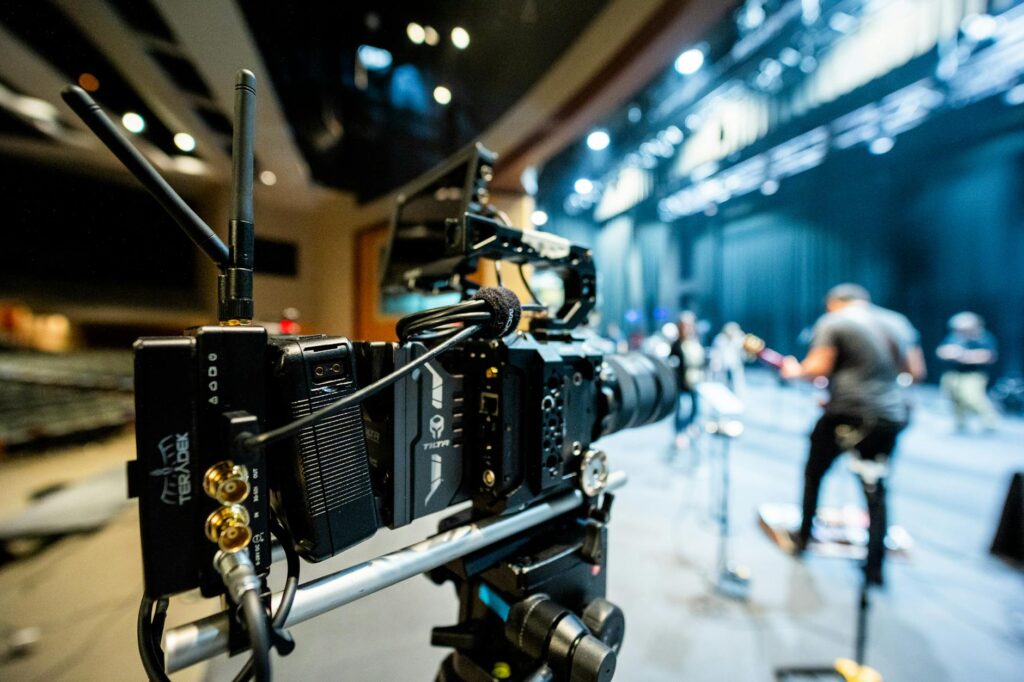
You don’t need to rent a RED camera. Seriously.
- Camera: Your smartphone is more than capable. Just make sure to film in landscape (horizontal) mode! It looks much more professional and cinematic. Wipe the lens before you start. It’s a simple step that makes a huge difference.
- Stability: A shaky camera is distracting and looks amateur. Don’t try to hold your phone. Prop it up on a stack of books or, even better, invest in a cheap tripod with a phone mount. It’s a game-changer for stability.
- Audio: Your phone’s built-in microphone can work if you’re in a very quiet room and close to the device. However, for crystal-clear audio, a simple lavalier (lapel) mic that plugs into your phone is a fantastic, affordable investment. Clear audio is more important than perfect video.
- Lighting: Good lighting is the secret sauce. The easiest and best option is natural light. Sit facing a large window. The soft, diffused light is incredibly flattering. If you don’t have good natural light, grab a couple of lamps. Place one on each side of the camera, slightly above you, to create a balanced look. A cheap ring light can also work wonders. Whatever you do, avoid sitting with a window or bright light *behind* you—you’ll end up as a dark silhouette.
Your Performance: How to Be Yourself on Camera
This can be the hardest part for many people. It feels awkward to talk to a lens. The key is to forget you’re making a ‘resume’ and pretend you’re having a conversation with a real person. Tape a picture of a friend next to the camera lens if it helps!
- What to Wear: Dress as you would for an interview at that specific company. When in doubt, it’s better to be slightly overdressed than underdressed. Avoid busy patterns, stripes, or all-white/all-black outfits, as they can look strange on camera. Solid, jewel-toned colors often work best.
- Body Language: Sit up straight or stand tall. Good posture conveys confidence. Smile! It makes you seem approachable and enthusiastic. Use natural hand gestures as you would in a normal conversation. And most importantly: look directly into the camera lens. Not at the screen, not at yourself. The lens is their eyes. It creates a powerful connection.
- Delivery: Speak clearly, and at a natural pace. Don’t rush! It’s okay to pause for effect. Vary your vocal tone to keep it engaging. The goal is to sound passionate and authentic, not robotic. Do multiple takes. Your first one will probably be stiff. Your fifth one will feel more natural. Your tenth one might be the winner. Give yourself permission to mess up and try again.
Pro Tip: Before you film your final version, do a quick test recording. Watch it back on a computer with headphones. How does the lighting look? Is the audio clear and free of buzz? Is your head centered in the frame? A one-minute test can save you from re-shooting the whole thing later.
Phase 3: The Cutting Room – Editing Your Video for Maximum Impact
You’ve got your footage! Now it’s time to assemble it into a polished final product. Editing is where you can trim the fat, add a little flair, and ensure your message is crystal clear.
Choosing Your Editing Software
Again, you don’t need to be a pro. There are tons of user-friendly options available:
- Free Options: DaVinci Resolve (incredibly powerful, but has a steeper learning curve), CapCut (great for mobile and desktop, very intuitive), iMovie (on Mac/iPhone), or Clipchamp (built into Windows).
- Paid Options: Adobe Premiere Pro (industry standard), Final Cut Pro (Mac only), or Descript (great for editing video like a text document).
For a basic video resume, any of the free options will be more than enough.
The Editing Checklist: What to Do
- Trim the Beginning and End: Cut out the awkward moments of you pressing record or reaching to turn the camera off. The video should start and end cleanly.
- Cut Out Mistakes: If you stumbled over a word but the rest of the take was great, you can often cut out the mistake seamlessly. If you have two different takes you like, you can cut between them. A simple, quick cut is usually fine.
- Add Your Name and Contact Info: Add simple, clean text (a ‘lower third’) at the beginning or end with your name, the title of the role you’re applying for, and maybe your email or LinkedIn profile URL. Don’t use crazy fonts or animations. Keep it professional.
- Consider B-Roll (Optional): For creative roles, you might want to splice in quick shots of your work (e.g., a graphic design portfolio, a clip of code, a photograph you took). This can be very effective but isn’t necessary for most roles.
- Check Audio Levels: Make sure your audio is at a consistent, clear volume. You might be able to use a simple ‘noise reduction’ filter to clean up any slight background hum.
- Export Correctly: Export your video as a high-quality MP4 file. A resolution of 1080p is standard and looks great without creating a massive file size.

The Final Step: Sharing Your Masterpiece
You’ve done it! You have a polished, professional video resume. Now, how do you get it into the right hands?
How to Deliver Your Video
Do NOT attach the video file directly to an email. Large files can get caught in spam filters or rejected by company email servers. Instead, you have a few much better options:
- YouTube or Vimeo: Upload your video to a platform like YouTube or Vimeo and set the privacy to “Unlisted.” This means only people with the direct link can view it. It won’t show up in public search results. This is the most common and reliable method.
- Cloud Storage: You can use a service like Google Drive or Dropbox. Upload the file and generate a shareable link. Make sure you set the permissions so that anyone with the link can *view* it (not edit!).
- LinkedIn: You can include a link to your video in your LinkedIn profile’s ‘Featured’ section. This is a great way for recruiters who find you on the platform to see it.
Where to Share the Link
Once you have your unlisted link, you can strategically place it where recruiters will see it:
- In Your Email Application: When you email a recruiter or hiring manager, include the link prominently. You could write something like, “To offer a better sense of my personality and passion for this role, I’ve created a brief video introduction: [Your Link Here]”
- On Your Resume: Create a hyperlink on your digital (PDF) resume. You could put it right under your name and contact information. Label it clearly, like “Video Introduction” or “My Video Resume.”
- In Your Cover Letter: A cover letter is a perfect place to direct someone to your video.
- On Your LinkedIn Profile: As mentioned, your ‘Featured’ section is prime real estate.

Conclusion: Your Secret Weapon in the Job Hunt
Creating a video resume takes more effort than just updating a few bullet points on a Word doc. There’s no doubt about that. But the potential payoff is enormous. It’s your chance to leap off the page, make a genuine human connection, and show a company who you are, not just what you’ve done. It proves you’re a modern professional who is willing to innovate and put in the work.
Remember, the goal isn’t to be perfect; it’s to be authentic. Let your passion for your field shine through. Be confident, be prepared, and be yourself. In a sea of black and white text, your video resume is your chance to be in full, unforgettable color.
FAQ: Frequently Asked Questions
1. How long should a video resume be?
The golden rule is to keep it short and sweet. Aim for 60 to 90 seconds. A recruiter is unlikely to watch anything longer than two minutes, so you need to make every second count. Get straight to the point, deliver your value, and end with a clear call to action.
2. Do I need to make a different video for every job I apply for?
Ideally, yes, or at least you should customize it. While you can have a general ‘evergreen’ version for your LinkedIn profile, the most effective video resumes are tailored to a specific company and role. You should at least re-record the intro and the ‘desire’ section where you mention the company by name and connect your skills to the specific job description. This shows genuine interest and effort.
3. What if I’m not in a ‘creative’ field? Is a video resume still appropriate?
Absolutely! While they started in creative industries, video resumes are now valuable for almost any field. For roles in sales, marketing, customer service, project management, or leadership, it’s a perfect way to demonstrate your communication and interpersonal skills. For more technical roles (like an accountant or engineer), it can help you stand out by showing your personality and passion for the work, which can be hard to convey otherwise.


 Why a Real Student Vacation is Crucial for Success
  Your University Library: More Than Just Books
  Protecting Your Intellectual Property: A Student’s Guide
  Psychology of Motivation: What Drives Students to Succeed
  Fact-Check & Verify Information in the AI Era: Your Guide
  VR and AR in Studies: The Ultimate Student Guide
  Backtest Crypto Trading Strategies: A Complete Guide
  NFT Standards: A Cross-Chain Guide for Creators & Collectors
  Decentralized Storage: IPFS & Arweave Explained Simply
  How to Calculate Cryptocurrency Taxes: A Simple Guide
  Your Guide to Music NFTs & Top Platforms for 2024
  TradingView for Crypto: The Ultimate Trader’s Guide